How To Update Your Apple Watch To watchOS 26 And What’s New
Apple has officially rolled out watchOS 26, a major update that introduces fresh design elements, smarter health tracking, and new ways to personalize your Apple Watch. Compatible with models from Series 6 through Series 11, along with the 2nd and 3rd-generation SE and all Ultra models, this release focuses on usability, health insights, and AI-powered motivation.
Whether you’re upgrading for the sleek new interface or the practical health alerts, here’s everything you need to know — plus a step-by-step guide on how to install watchOS 26.
What’s new in watchOS 26?
Apple has bundled both visual refinements and meaningful upgrades that impact daily use. Let’s break them down:
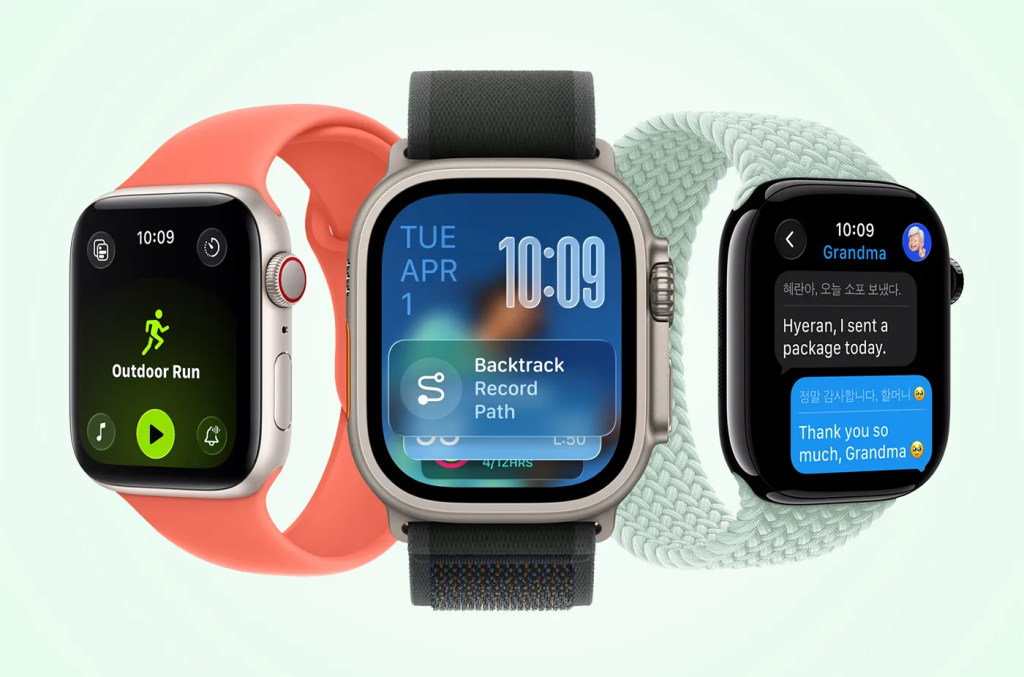
A new design language: Liquid Glass
- What it is: Apple’s Liquid Glass design brings a glossy, semi-transparent look to app windows, notifications, and icons.
- Why it matters: While subtle compared to iPhone or Mac, the shimmering effect makes Smart Stack, Control Center, and apps feel more modern and cohesive.
- Takeaway: Expect a sleeker watch UI without a learning curve.
Wrist flick gesture for faster actions
- How it works: Rotate your wrist outward to silence calls, dismiss notifications, or stop timers.
- Why it matters: It’s quicker than the older double-pinch gesture and more natural in real-world scenarios like meetings or workouts.
- Example use case: Imagine silencing an alarm while carrying groceries; no taps required.
Smarter audio and Notes on your wrist
- Automatic volume adjustment: Calls, Siri responses, and notifications adapt dynamically to your environment. Louder in noisy streets, softer at night.
- Notes app integration: For the first time, you can create notes directly on your Apple Watch. Siri can also draft notes hands-free, turning your watch into a pocket notebook alternative.
Advanced health tracking features
- Hypertension notifications: Using optical sensors, your watch analyzes vascular responses over 30 days to detect early signs of high blood pressure.
- Note: This is not a substitute for medical diagnosis; users should consult a doctor if they receive repeated alerts.
- Sleep score: A simple numerical rating based on sleep duration, interruptions, and bedtime consistency.
- Why it matters: Instead of vague graphs, you now get a clear score that’s easy to track and improve.
Personalization with AI-powered Workout Buddy
- What it does: Uses your past fitness data to provide motivational prompts during workouts.
- Why it matters: Personalized encouragement can boost adherence to exercise routines, especially for casual users.
- Widget customization: Rearrange Smart Stack widgets to highlight what’s most relevant: weather, workouts, reminders, or stock prices.
How to update your Apple Watch to watchOS 26
Updating is straightforward, but a few requirements must be met first.
Before you start:
- Ensure your paired iPhone is running iOS 26.
- Keep your iPhone connected to Wi-Fi and near your watch.
- Charge your Apple Watch to at least 50%.
Step-by-step update process:
- Open the Watch app on your iPhone.
- Navigate to My Watch > General > Software Update.
- If watchOS 26 is available, tap Download and Install.
- Follow the on-screen prompts.
- Keep both devices close until the update completes.
Why should you update to watchOS 26?
- Better usability: Wrist flick gesture and smarter UI reduce friction in daily interactions.
- Deeper health insights: Hypertension alerts and sleep scores provide actionable health data.
- Enhanced personalization: Workout Buddy and customizable widgets give you a more tailored experience.
- Future-proofing: Installing watchOS 26 ensures ongoing security patches and app compatibility.
TL;DR
- watchOS 26 is now available for Apple Watch Series 6+, SE (2nd & 3rd gen), and Ultra models.
- Highlights include Liquid Glass design, wrist flick gesture, Notes app, hypertension notifications, and Workout Buddy AI.
- Update by pairing with an iPhone running iOS 26 → Watch app → General → Software Update.

‘Black October’ hacks explained: what’s AI, what isn’t, what to do
Batelco’s network operations centre in Bahrain, 2009. Photo: Masdestructive via Wikimedia Commons, CC BY-SA 3.0 (cropped) “Black October” is a nickname, not an attack. It’s the label social media gave to a pile-up of seven...
Doctor: If You Have Nail Fungus, Do This Immediately
doctor: if you have nail fungus, do this immediately...
iPhone Duo Screens Are Cracking at the Hinge. What to Do if Yours Does
An iPhone Duo on launch day, October 23, 2026. Photo: SimonWaldherr via Wikimedia Commons, CC BY 4.0 (cropped) A handful of iPhone Duo owners say their inner screens cracked along the hinge within hours of...
Do this twice a day, and everyone will think you have Botox!
do this twice a day, and everyone will think you have botox!...
Artemis III Won’t Land on the Moon. NASA’s New Plan, Explained
The Artemis III SLS core stage is lifted inside the Vehicle Assembly Building at NASA’s Kennedy Space Center in Florida. Photo: NASA via NASA Image and Video Library, public domain (cropped) Artemis III will not...
Lose 40 lbs by Consuming Before Bed for a Week
lose 40 lbs by consuming before bed for a week...
Flying Into the US After Nov. 3? Every Passenger Signs an Ebola Form
A CBP officer interviews an arriving passenger during enhanced Ebola screening at Washington Dulles International Airport in October 2014. Photo: Josh Denmark/U.S. Customs and Border Protection via Wikimedia Commons, public domain (cropped) Starting the night...
If You Find Moles or Skin Tags on Your Body, Read About This Remedy
if you find moles or skin tags on your body, read about this remedy...
Misiorowski’s 103.5 mph Record: How He Throws It, and the Elbow Risk
Jacob Misiorowski pitching for the Milwaukee Brewers at American Family Field in June 2025. Photo: Drovetochicago via Wikimedia Commons, CC BY-SA 4.0 (cropped) Jacob Misiorowski’s first pitch of the World Series was a 103.5 mph...
Salvation From Baldness Has Been Found! (Do This Before Bed)
salvation from baldness has been found! (do this before bed)...
2026 Senate races to watch: where Democrats need 4 seats
The US Capitol, where the Senate and House meet, in September 2013. Photo: Martin Falbisoner via Wikimedia Commons, CC BY-SA 3.0 (cropped) Control of the Senate in the 2026 midterms comes down to about seven...
People From US Those With Knee And Hip Pain Should Read This!
people from us those with knee and hip pain should read this!...